


List faster with eBay’s new AI-powered bulk listing tool
ebay.co.uk, ebay.de
Just upload your item photos and let AI work its magic.
- What you need to know
- How it works
- Why use it
- Let’s go
- FAQs
What you need to know
eBay’s excited to announce that it’s rolling out the new AI-powered tool for bulk listings. It’s a quicker, easier way to create multiple detailed, high-quality listings across every category. Get more inventory in front of eBay buyers faster, with listings that stand out and help drive sales.
How it works
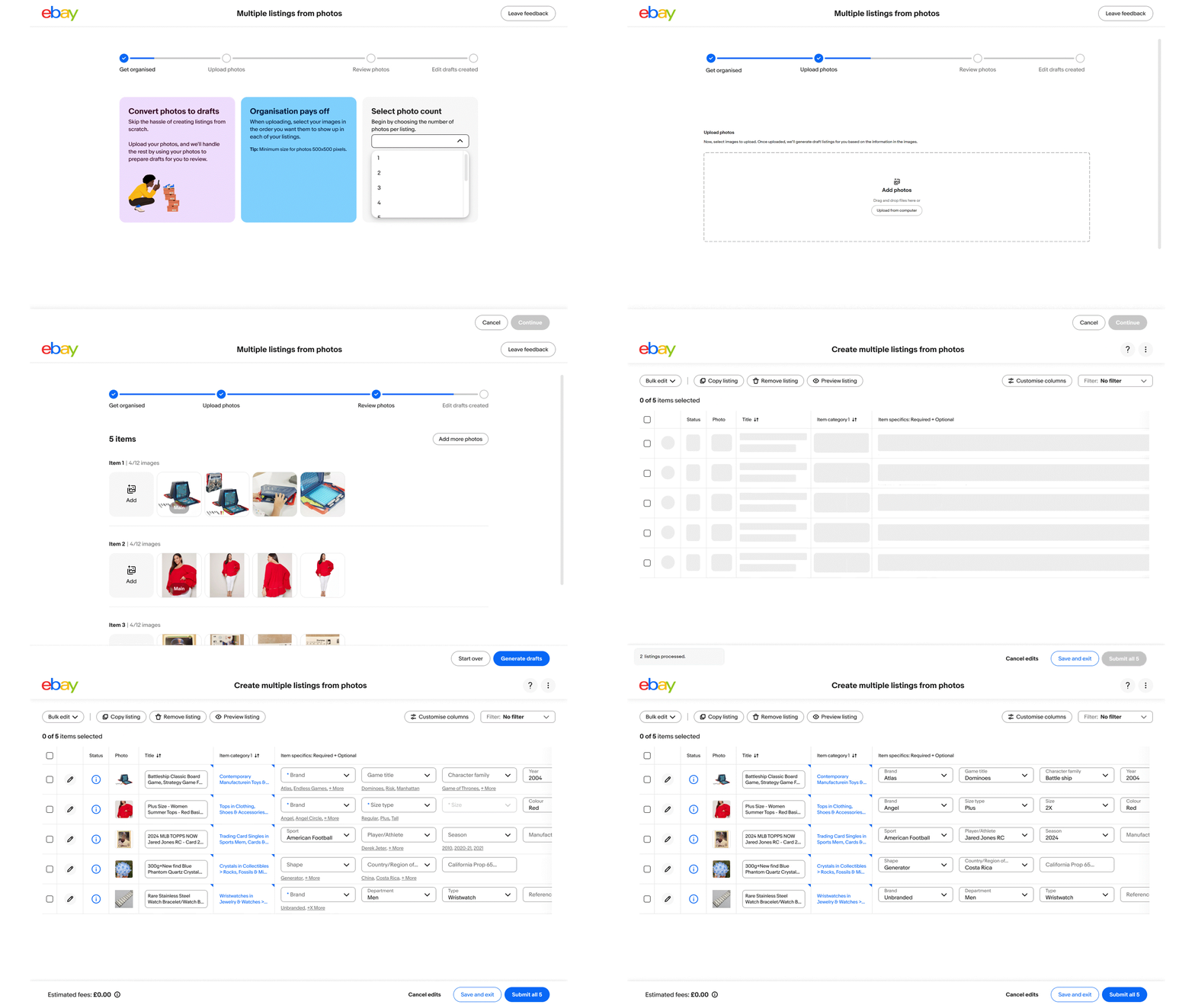
eBay’s AI-tool is designed to craft compelling listings that grab buyers’ attention and help encourage clicks. All you have to do is:
- Upload your product photos and watch the magic happen.
- eBay’s tool will scan your images and immediately suggest ready-to-publish draft listings, populating things like categories, titles, and item specifics.
- Take a moment to review the details and publish.
Why use it?
It’s fast
The tool scans your product photo in a matter of seconds and suggests listings that are pretty much ready to go, removing the need for you to manually fill out item specifics for bulk listings, which can be quite time-consuming.
It’s easy
The simplified, guided process will help you effortlessly create bulk listings tailored to shine.
It’s high-quality
eBay’s AI-driven insights guide you towards top-quality listings, helping you attract more buyers and scale your business. The more you use it, the better it gets to help your products stand out.
It’s available for all categories
Fashion and Sports Trading Cards sellers have already seen success, so put a spotlight on your items and watch this tool work for you.
Ready? Let’s go
The AI-tool for bulk listings is now available to all sellers on desktop when opted in to Seller Hub. If you’re not opted in, just click Start using Seller Hub and follow the steps below:
- Head to your Listings page on Seller Hub and click Create listings.
- Select Multiple listings from photos in the drop-down.
- Choose the number of photos per draft that you want to upload.
- Once uploaded, you’ll see ready-to-publish listings. Just review the details for accuracy and edit if necessary. Then, publish your listings.
Visit Seller Hub now to get started and prepare for the year.
FAQs
When will this be available to all sellers?
How many drafts can I create at once?
Is this available on the eBay app?
Why are some item specifics prefilled and some are not?
What if the listing details that are automatically filled in are inaccurate?
What if I want to add details to the listing that aren’t available in this view?
How are my postage, return and payment policies applied?
Can I opt out of using this tool?
Buyer protection
ebay.co.uk
More protection for your buyers.
- What you need to know
- How this helps your business
- Changes for private sellers
- What’s next?
- FAQs
What you need to know
You may have already heard the exciting news — buyers will soon benefit from a brand new protection every time they shop on eBay. This will come at no extra cost to business sellers or your buyers, and is part of eBay’s efforts to make it the best marketplace for eBay’s community. From 4 Feb, Buyer Protection will be included on every purchase on ebay.co.uk to give buyers more confidence and security when they shop.
How this helps your business
For business sellers, Buyer Protection will be included on your listings for free. This way, your buyers get the protection without the cost. With this, all buyers and sellers will get 24/7 customer support, where you can connect with a real person by phone whenever you need, or start a chat to get quick answers.
eBay’s also still got you covered with secure transactions, thanks to payments that are encrypted end-to-end and handled by eBay’s trusted payment partners.
To help drive sales to your business, Coupons, Multi-buy, and other discount tools are now only available to business sellers. You can also look forward to more exclusive benefits in the future.
Learn more about Buyer Protection
Changes for private sellers
eBay recently updated its fee structure, making it free for private sellers to sell on eBay (excl. Vehicles). As part of this, a Buyer Protection fee will be added to listings from UK-based private sellers so eBay can make investments into these protections. This fee will be included in the item price and be paid by the buyer.
To give buyers more protection and encourage timely shipment, private sellers will be paid once the item is delivered. Nothing will change for business sellers, and you’ll still receive your payouts as usual.
eBay’s also monitoring trading activities, and offering assistance to business sellers using a private account to transition to a business account, or restricting selling activity as necessary. This is to help ensure a fair and equitable marketplace for business sellers.
What’s next?
There’s nothing you need to do. From February 4, Buyer Protection will be included on your listings at no extra cost. eBay’s committed to providing you with the opportunities to help you succeed on eBay, and can’t wait to see what you achieve.
Buyer Protection excludes Vehicles, Classified Ads and Property.
FAQs
Who pays the Buyer Protection fee?
I'm a business seller. What does this mean for me?
How do I get paid?
What’s the difference between Buyer Protection and eBay Money Back Guarantee?
Changes to Promoted Listings
ebay.de
- What you need to know
- Exclusive ad placement for Priority campaigns
- Changed allocation of listings with a General strategy
- What’s next?
- FAQs
What you need to know
Are you already promoting your eBay listings or have you planned to do so in 2025? Please note our changes that will come into effect on eBay.de on February 26, 2025.
Exclusive ad placement for Priority campaigns
From February 26, 2025, listings with a Priority strategy will receive exclusive access to the first ad positions in the search results on eBay.de. This means that your Priority listings will be seen more quickly, increasing your sales opportunities.
The next step: You don't need to do anything else, because you will automatically gain more visibility with your existing Priority campaigns too.
Tip: Also try Smart Targeting and our recommended campaigns to maximize the potential of this campaign type.
Changed allocation of listings with a General strategy
From February 26, 2025, the allocation of ads with a General campaign strategy will change.
The following still applies to this type of campaign: eBay will only charge you if your promoted item is sold. What is new is that from February 26, sales and the ad rate will be recorded and charged regardless of whether the buyer has clicked on the ad themselves.
Prerequisites:
- The item was promoted both at the time of the click and at the time of the sale
- The ad was clicked at least once within the last 30 days before the sale
- The ad rate that was set at the time of the sale is then calculated
What’s next?
The change will take effect automatically on February 26 and no further action is required. However, as with any change, we recommend that you monitor the performance of your listings and adjust your strategy accordingly.
International updates in details
Do you sell on other eBay sites? Here you'll find the main Seller Update pages from eBay sites around the world.
Canada — ebay.ca (in English)
Canada — cafr.ebay.ca (in French)
Germany — ebay.de
United Kingdom — ebay.co.uk